Do I need to play TOEM 1 first?
No. TOEM 2 is a sequel years later. Homelanda explains the festival/event without assuming you remember every first-game town.

TOEM 2 beginner guide: camera zoom and focus, jump and climb, photo hand-ins, stamps that open the next region. PC, PS5, Switch — not Xbox. Verified Sep 2026.
Homelanda camera, jump, climb, first photo hand-ins and stamps.
~10 min read
TOEM 2 is a single-player photo adventure from Something We Made, published with Something We Made, popagenda, released September 29, 2026 on PC (Steam) · PlayStation 5 · Nintendo Switch · Nintendo Switch 2. This TOEM 2 beginner guide is the first-hour loop: move in three dimensions, raise the camera, prove a request with a shot, then bank stamps so the bus can leave Homelanda. Verified September 30, 2026 · Steam · developer site.
| Fact | Detail |
|---|---|
| Platform | PC (Steam) · PlayStation 5 · Nintendo Switch · Nintendo Switch 2 |
| Genre | Photography adventure · cozy puzzle exploration |
| Mode | Single-player |
| Price | $19.99 USD (check live store) |
| Release | September 29, 2026 |
| Play pace | No time limit; completion is self-paced |
| Steam Deck | Steam Deck support listed on the Steam store page |
| Combat | None — camera, jump, climb, and attachments |
| Xbox | Not on Xbox — ignore that autocomplete |
Homelanda is the teaching neighborhood: house, yard, and the first bus. The store copy says you step back into a curious photographer’s shoes years after the original game. You do not need a TOEM 1 save. Work this order before you worry about farm gnomes or city pipes.
Empty photo frames in the home are a hint, not clutter. Early shots of family and the building itself are valid “sights.” Achievement toasts can fire while you are still in the yard — treat them as proof the game tracks photos, not as a combat rank-up.
When you are ready to leave, the bus line is stamp-gated. The furthest stop named from Homelanda in launch-week play is the farm hamlet (public spelling Cropten / Cropton). You cannot sequence-break into Deltburg from the driveway.
Story opening involves the photographer and a grandmother figure. In-game copy on the first camera job asks for a photo of Nana. Later residents include farmers, builders, and city workers — this wiki will not invent given names from slurred capture audio. If a name is not on a screenshot or the official site, we write the role instead.
The next skill that actually changes the map is vertical movement. Streets in TOEM 1 were flatter; here a roof is often the real path.
Jump and climb are the sequel’s movement upgrade. Official notes list higher platforms, hidden paths, rooftop critters, and clothes on ledges. The first set piece is a kicked antenna: while airborne, press into the boards to grab, jump again to go up, and use the drop bind to let go.

| Move | What it is for |
|---|---|
| Walk / run | Street-level requests, shops, talking |
| Jump | Gaps, low roofs, kicking props like an antenna |
| Grab while airborne | Ladders of boards, window ledges, stacked crates |
| Let go / drop | Abort a bad grab without wasting a full reset |
| Camera after you land | Do not try to frame a shot while the grab prompt is still live |
A Nintendo-style capture showed jump on one face button and drop on another. Steam and DualSense layouts remap those. Learn the verbs — jump, grab, let go — in the pause or settings screen instead of memorizing a letter from someone else’s HUD.
If a climb feels sticky, you are usually not holding toward the surface. Approach, jump, then keep the stick into the wall until the grab latches.
Birds, ribbons, and interior attics sit above the sidewalk. If a critter icon appears “near you” but you see nothing at street height, look at chimneys and second-story rails. Outfits follow the same rule.
Once you can leave the ground on purpose, the camera is the other half of this beginner guide.
The camera is the puzzle tool, not a selfie filter. Residents ask for a subject, a pose, or a proof shot. You raise the viewfinder, compose, shutter, then talk again. A fancier body than TOEM 1’s kit is handed over in Homelanda with dynamic zoom already on it.
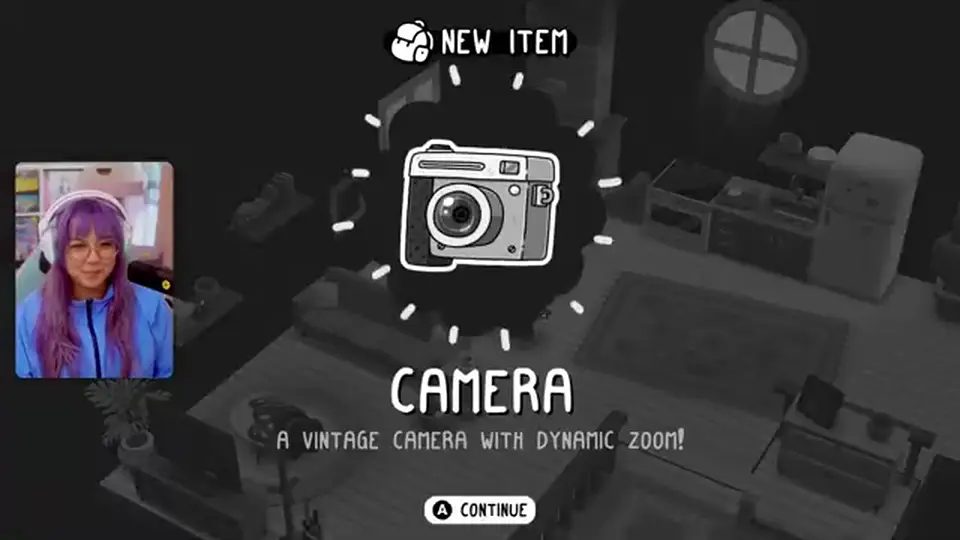
| Step | Check |
|---|---|
| Talk first | The request text tells you what must be in frame |
| Raise the camera | Street view is not the same as viewfinder view |
| Zoom | Pull in for portraits (Nana), out for houses and landscapes |
| Shutter | Take a second shot if the first is cropped wrong — extra files are cheap |
| Show the photo | The NPC inspects the picture; a wrong subject fails the hand-in |
Nana’s job is a posed portrait: she waits, you frame, she comments. A “home sweet home” style sight is a wide of the house, the yard, or a landmark. Both write into completion trackers, but only the named request pays the stamp sitting on that quest.
Empty frames in the bedroom accept a print you like. That is decoration, not a second stamp farm.
Focus (next section) can lock the viewfinder so a moving cow or a posing relative stays composed. Hold the lock control with the camera open — the exact bind is in your device map.
A valid shot still needs the right subject. Photographing a chicken when the slip asked for Nana will not clear the job.
Matched by build plan, shared topics, and guide progression — not random related links.
Zoom is always available. Focus is the “something odd is here” mode. Public recaps use it on clouds, cavern light in Taletorp, and a single leaf in Whirhill. Homelanda introduces the idea while you are still in the yard so later regions do not have to pause the story.
Zoom inspects a newspaper, a far roof, or a tiny prop without walking there. Focus is a separate toggle: it highlights or locks on objects the game treats as puzzle targets. If a task says to look at the sky or a specific leaf, spray snapshots will not register.
Each later region adds an attachment (hammer, screwdriver/wrench, scissors, hover cam). Those are not beginner loadouts — they unlock with the area. Full gadget list: camera tools.
Filling the album with random walls does not complete a focus job. Read the journal line: if it names a phenomenon, switch focus on, then shutter.
When the picture is right, the remaining skill is paperwork: showing it, then watching stamps land.
Stamps are regional progress, not a currency you spend in a shop. Complete the resident’s request, watch the stamp drop onto the journal page, repeat until the bus attendant accepts that Homelanda (or the current region) is done enough to leave.
| Action | Result |
|---|---|
| Show the correct photo | Quest completes; stamp(s) appear |
| Open the journal | See remaining tasks, critters, and sights |
| Hit the leave quota | Bus / region gate opens |
| Keep exploring past quota | Extra stamps, clothes, wildlife — optional |
The first camera beat (Nana) is designed to show the stamp animation immediately — a handful of marks, not a 20-slot farm page. Treat it as UI teaching.
Full rules, quotas, and what does not count: TOEM 2 stamps.
Official copy: no time limit and no hard requirement for full completion. You can leave a region after the story quota and return later for critters. Confirm return travel in your build if a recap disagrees.
Before you farm, know what the sequel actually changed — that is the next section.
TOEM 2 is a sequel set years later, not a remake. Mixing first-game walkthroughs into this beginner guide is how players look for the wrong towns.
| Topic | TOEM 1 | TOEM 2 |
|---|---|---|
| Vertical move | Mostly walk-and-look dioramas | Jump, climb, roofs, high collectibles |
| Camera | Photo adventure kit | Dynamic zoom; later attachments per region |
| Setting | Original photo trip | Homelanda → Cropten/Cropton → Taletorp → Deltburg → Whirhill |
| Demo | Separate from this sequel | Steam demo is a Deltburg city slice, not Homelanda |
| Must own the first game? | N/A | No — Homelanda explains TOEM as a festival/event |
Launch-week play comments on a more three-dimensional home and a polished camera body. That is presentation. The systems that matter for this page are still: photo proof, stamps, journal.
If a search result is titled for “TOEM” without “2,” assume first-game maps until you see Homelanda or Deltburg.
Use this as a mid-page checklist before you blame a “softlock.” Almost every stall is a missed photo type, a skipped climb, or a TOEM 1 guide.
| Mistake | Fix |
|---|---|
| Never leaving the street | Jump and grab — roofs hold birds, clothes, and sights |
| Shutter without reading the request | Talk first; Nana is not a random cow photo |
| Ignoring focus jobs | Toggle focus for named sky / cave / leaf shots |
| Expecting Xbox or Roblox | PC, PS5, Switch / Switch 2 only |
| Following a TOEM 1 town list | Use Homelanda and the five-region walkthrough |
| Treating the Steam demo as the campaign | Demo = Deltburg slice — demo guide |
| Skipping the journal | Quota and leftover tasks live there |
| Waiting for combat | There is no weapon loop on this wiki |
After every conversation, open the journal before you wander. If the line still says “photo of…,” you have not handed in. If it says a stamp count versus a maximum, you know whether the bus will move.
When Homelanda’s teaching stamps are in, the natural next page is the stamp system itself — quotas get large on the farm.
Next: bank Homelanda stamps, then open the stamps guide so you know the farm-region quota (more stamps exist than you need to leave). After that, run the walkthrough in region order, or try the Deltburg demo if you have not bought the full game.
Gadgets that appear after Homelanda: camera tools. Questions about invites: Discord.
No. TOEM 2 is a sequel years later. Homelanda explains the festival/event without assuming you remember every first-game town.
Jump toward a climbable surface, hold into it to grab while airborne, jump again to ascend, and use the drop bind to let go. Check your platform’s control map.
Read the request, raise the camera, zoom for portraits or wides, shoot, then talk again to show the picture. Wrong subject fails the hand-in.
It is the puzzle lock for odd targets (clouds, cave light, a single leaf later). Zoom alone is not enough for those jobs.
No. Stores list PC (Steam), PlayStation 5, and Nintendo Switch / Switch 2.
No. Attachments hammer nails and snip vines; they are not weapons.
No time limit; completion is self-paced. Full completion is optional.
A free Deltburg slice — not Homelanda. Details on the demo page.
The stamps page, then the walkthrough.
September 30, 2026
Matched by build plan, shared topics, and guide progression — not random related links.